2023年12月电子学会青少年软件编程(Python六级)等级考试试卷
客观题
六级
2023
2024-01-05 11:55:27
55次
一、单选题
下面代码的输出结果是?( )
import matplotlib.pyplot as plt
import numpy as np
x = np.linspace(0, 10, 100)
y1 = np.sin(x)
y2 = np.cos(x)
plt.subplot(2, 1, 1)
plt.plot(x, y1)
plt.xlabel('x轴')
plt.ylabel('y1轴')
plt.subplot(2, 1, 2)
plt.scatter(x, y2, color='r')
plt.xlabel('x轴')
plt.ylabel('y2轴')
plt.tight_layout()
plt.show() | A. 显示一个子图,包含一个包含折线图的区域和一个包含散点图的区域 |
B. 显示一个子图,包含一个包含折线图和散点图的混合图形 |
| C. 显示两个子图,分别包含折线图和散点图 |
D. 不显示任何内容 |
【知识点】 电子学会Python六级
以下程序实现:把'xiaoming'的个人信息填到family的csv文件中,再读取出来。空格处应填?( )
import json
import csv
fam = {'name':'xiaoming','age':18,'gender':'nan'}
with open('family.csv','w') as f:
    json.     (fam,f)
with open('family.csv','r') as f1:
    read1 = json.    (f1)
print(read1) | A. reader,writer |
B. writer,reader |
| C. dump,load |
D. load,dump |
【知识点】 电子学会Python六级
以下Python代码为在tk上绘制一个图形,请问绘制的图形是?( )
import tkinter as tk
root = tk.Tk()
canvas = tk.Canvas(root, width=300, height=300)
canvas.create_rectangle(100, 100, 200, 200, outline="red")
canvas.pack()
root.mainloop()
| A. 100*200的矩形 |
B. 300*300的矩形 |
| C. 100*100的矩形 |
D. 200*100的矩形 |
【知识点】 电子学会Python六级
运行以下程序,输出的结果是?( )
import sqlite3
conn = sqlite3.connect('t1.db')
cursor = conn.cursor()
conn.execute("DELETE from user")
cursor.execute('insert into user (id, name) values (\'1\', \'张三\')')
cursor.execute('insert into user (id, name) values (\'2\', \'李四\')')
cursor.execute('insert into user (id, name) values (\'3\', \'王二\')')
cursor.execute('insert into user (id, name) values (\'4\', \'刘五\')')
conn.commit()
cursor.execute('select id,name from user')
values = cursor.fetchone()
values = cursor.fetchone()
print(values)
cursor.close()
conn.close() | A. ('4', '刘五') |
B. ('1', '张三') |
| C. ('2', '李四') |
D. ('3', '王二') |
【知识点】 电子学会Python六级
下面的代码定义了一个Circle类,用于表示圆形的信息。请问执行下面的代码后,会输出什么?( )
class Circle():
    def __init__(self, radius):
        self.pi=3.14
        self.radius = radius   #半径
    def area(self): #面积
        return  self.pi * self.radius ** 2
    def perimeter(self):   #周长
        return 2 *  self.pi * self.radius
c = Circle(4)
print(c.area())
print(c.perimeter())
| A. 25.12 50.24 |
B. 没有输出 |
| C. 50.24 25.12 |
D. 会报错 |
【知识点】 电子学会Python六级
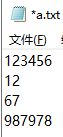
下面哪个代码可以创建一个名为cat的实例,属于Animal类,有color和sound两个属性,分别赋值为"black"和"meow"?( )
| A. cat = Animal() |
B. cat = Animal() cat.color = "black" cat.sound = "meow" |
| C. cat.color = "black" cat.sound = "meow" cat = Animal() |
D. cat = new Animal() cat.color = "black" cat.sound = "meow" |
【知识点】 电子学会Python六级
有如下Python代码,如图状态下,点击提交按钮,文本框内显示的内容为?( )
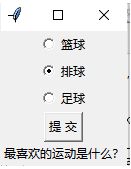
import tkinter as tk
def show_selected_option():
    selection = variable.get()
    p={1:"篮球",2:"排球", 3:"足球"}
    label.config(text=f"最喜欢的运动是 {p[selection]}")
root = tk.Tk()
options = [("篮球", 1), ("排球", 2), ("足球", 3)]
variable = tk.IntVar()
for text, value in options:
    tk.Radiobutton(root, text=text, variable=variable, value=value).pack()
button = tk.Button(root, text="提 交", command=show_selected_option)
label = tk.Label(root, text="最喜欢的运动是什么?")
button.pack()
label.pack()
root.mainloop() | A. 最喜欢的运动是排球 |
B. 最喜欢的运动是篮球 |
| C. 最喜欢的运动是足球 |
D. 最喜欢的运动是2 |
【知识点】 电子学会Python六级
下面代码的输出,最合理的选项结果是?( )
import matplotlib.pyplot as plt
import numpy as np
x = np.linspace(0, 10, 100)
y = np.sin(x)
plt.plot(x, y)
plt.xlabel('x轴')
plt.ylabel('y轴')
plt.title('简单折线图')
plt.show() | A. 显示一个简单的折线图 |
B. 显示一个已经标注了标题、x轴和y轴标签的简单折线图 |
| C. 显示一个已经标注了 x 轴和 y 轴标签的简单折线图 |
D. 不显示任何内容 |
【知识点】 电子学会Python六级
二、判断题
运行如下代码,点击按钮Greet后label框内显示“Hello, World!”字样。( )
import tkinter as tk
def greet():
    label.config(text="Hello, World!")
root = tk.Tk()
label = tk.Label(root, text="")
button = tk.Button(root, text="Greet", command=greet)
label.pack()
button.pack()
root.mainloop()
| A.正确 | B.错误 |
【知识点】 电子学会Python六级